
Overview
How to resend a reward notification email that was fulfilled as Tango Choice Product (Reward Link or Promo Link) reward notification email, and if needed update their email address.
Note: The following instructions are specifically for the email notification sent when you’ve fulfilled a reward as a Tango Choice Product (Reward Link or Promo Link or Global Choice Link). If you need help with the reward email sent to the recipient from Tango after their redemption checkout which includes their reward choice details, scroll down for options on how to proceed.
Instructions to Resend Fulfillment Notification
- With Ambassador 3, go to Rewards & Payments > Transactions > Rewards tab
- Filter for the Contact email or other identifying detail to locate the reward. Alternatively, you can filter for Fulfillment Method is Tango Choice Product.
- Once you’ve identified the reward transaction(s), select the applicable checkbox(es).
- Select Resend Email.
- The following steps depend on what’s needed:
- If the email address is correct, select Resend Email.
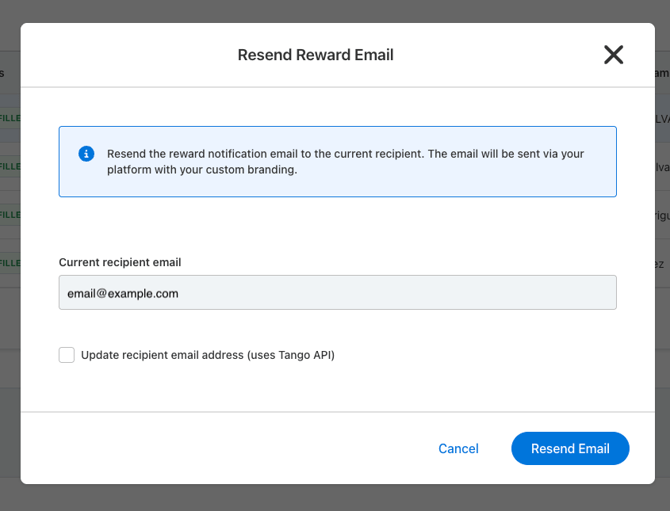
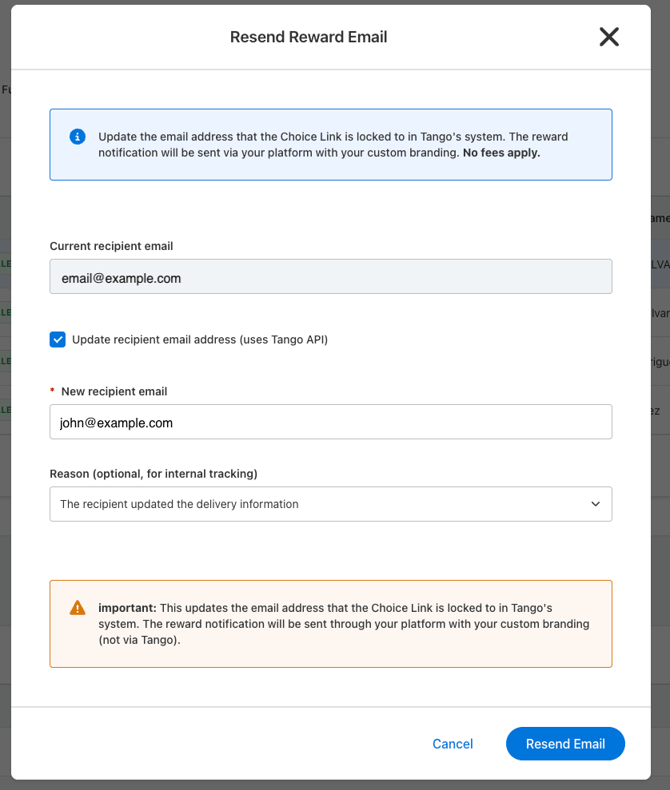
- If the email address needs to be changed, follow these steps:
- Select Update recipient email address (uses Tango API)
- Type or paste in the new recipient email
- Select the reason The recipient updated the delivery information
- Select Resend Email
- If the email address is correct, select Resend Email.
- Next Steps Based on the Scenario:
- If the email was changed, it will also be changed on the Tango side to unlock it and allow the recipient to redeem it with the new email address.
- If the reward was originally fulfilled from an Automation in Ambassador 3, you’ll receive a prompt to confirm the email template to use.
- If the reward was originally fulfilled as a commission in Ambassador 2, it will send a default email with your email domain and logo.
Options to retrieve reward credentials after Tango redemption checkout
If your reward recipient has reported that they did not receive an email from Tango with their reward credentials after redemption checkout, below are a few options to consider:
- Tell them to search their inbox across their spam folder and other tabs for an email from noreply@tangocard.com.
- They can also follow the original Redemption URL > click on the “Redemptions” tab > and there they can see the redemption activity, confirm what email it was sent to and click “Resend” or “Help”
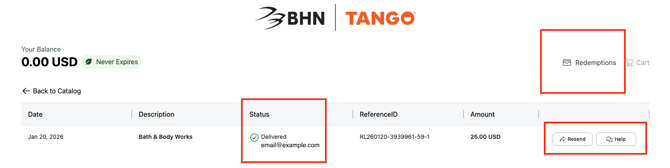
- If the email was sent to another address and they’ve already redeemed, you or they will need to reach out to cs@tangocard.com for support.