
New to RBAC? Review RBAC Overview: Managing Access with Users, Groups & Roles to learn how roles, permissions, groups, and user access work in the Ambassador Admin application.
What's the difference between a User, Role, and Group?
-
User: An internal user who has access to the Ambassador Admin application.
-
Role: A collection of permissions that determines what a user can access and manage.
-
Group: A collection of users used for notification routing. Groups do not grant permissions.
-
For Example: A Group called “Reward Funding Group” could be setup for users like Admin, Marketing, and Finance. Then that group can be assigned to a notification when the reward funding balance is low. This ensures there is enough coverage to recognize the need to add more funds and marketing is aware to hold any new fulfillment until more funds are available.
-
What’s the difference between User Status Definitions?
-
Active: User can access the Ambassador Admin application.
-
Invited: User has been invited but has not logged in yet.
-
Inactive: User cannot log in but historical records are preserved.
Can I restrict a user to a specific program or campaign?
No. RBAC controls access to features and functionality within the Ambassador Admin application. It does not currently support restricting users to specific programs, campaigns, business units, or subsets of data.
For example, if a user has access to Programs & Campaigns, they can access all programs and campaigns within the account.
A Hierarchy feature is on the roadmap to support this type of functionality in the future. Let our team know if this is something you’re interested in.
Can Groups grant permissions?
No. Groups are used for notification routing only. Permissions are controlled by roles.
Can I assign multiple roles to a user?
Yes, a user can be assigned multiple roles. However, in most cases, we recommend assigning a single role that best matches the user's responsibilities to keep access management simple and easy to maintain.
What does a user see when they do not have permissions to something?
The item is greyed out. When clicked, a popup appears with an Access Denied message directing them to reach out to one of the administrators in Ambassador.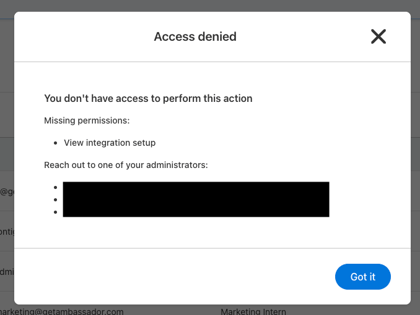
Why can't a user export data?
Export permissions are controlled separately from view permissions.
Review the user's assigned role and verify that export permissions have been granted for the appropriate resource.
What is the difference between Active, Invited, and Inactive?
- Active: The user has logged in and can access the Ambassador Admin application.
- Invited: The user has been invited but has not yet logged in.
- Inactive: The user has been deactivated and can no longer log in.
What happens when I deactivate a user?
When a user is deactivated:
- They can no longer log in.
- Historical attribution, reporting data, and audit history is preserved.
Can I reactivate a user?
Yes. Inactive users can be reactivated at any time by a user with the appropriate permissions.
Once you delete a user, they cannot be reactivated. You will need to create a new user.
Who can manage Users & Roles?
Only users with Full Access to the Users & Roles resource can:
- Create users
- Edit users
- Manage roles
- Manage groups
- Update user permissions
Can users edit their own profile information?
Users with Full Access to Users & Roles can edit user records, including their own.
This includes:
- First Name
- Last Name
- Email Address
- Job Title
- Phone Number
- Role assignments
- Group assignments
Users without access to Users & Roles cannot modify user records.
Can I change a user's email address?
Yes. Users with Full Access to Users & Roles can update a user's email address.
A user cannot change their own email address unless they have Full Access to Users & Roles.
Can I edit a default role?
No. Default roles cannot be edited. If you need to modify a default role, clone it and create a custom role.
Can I delete a default role?
No. Default roles cannot be deleted.
Can I create custom roles?
Yes. Custom roles can be created to support your organization's access requirements.
You can:
- Clone a default role and modify it
- Create a role from scratch
- Create a custom role while creating or editing a user using Customize Permissions
What should I do if a user doesn't receive their invitation email?
Ask the user to:
- Check their spam, junk, or quarantine folders for an email from hello@getambassador.com.
- If it was found in one of those folders, confirm that emails from @getambassador.com are allowed by their organization's email security settings to avoid anyone on your team missing important notifications.
- If the email is not found:
- If Password field is enabled for your company - instruct them to visit the login page - https://admin.getambassador.com/login/ - and reset their password.
- If Password field is disabled for your company with SSO - instruct them to attempt to login with the SSO. If they are unable to, contact your IT team.