
When you create an email or SMS template for use in an Automation, you can assign it a goal — the main action you want recipients to take after receiving the message.
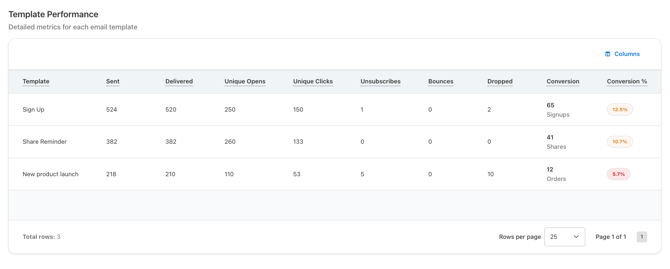
This goal becomes the conversion metric shown in the Email/SMS dashboard for that template, helping you measure whether the communication is achieving its intended purpose.
For example, an email designed to motivate advocates to share referrals should be evaluated on shares — not signups or orders. Setting the right outcome ensures the right metric is always front and center in your reporting.
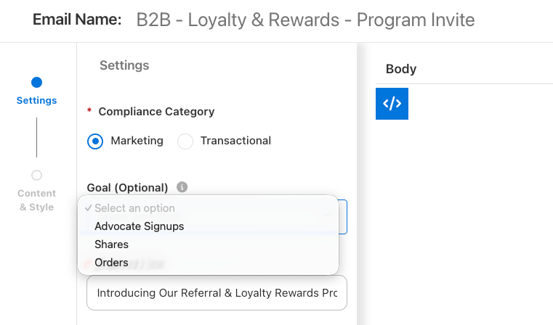
Available Goals
When creating or updating your Email or SMS template, You can choose from three goals:
Advocate Share — Tracks whether the email or SMS successfully encourages advocates to share. A conversion is counted when an advocate clicks a share button (e.g., WhatsApp, social media) in the email or SMS.
Signups — Tracks how effective the email or SMS is at generating new advocate enrollments. A conversion is counted when a prospect receives the message, clicks through to an enrollment page, and completes signup.
Orders — Tracks whether the email or SMS drives completed purchases. A conversion is counted when a referred customer receives the message, clicks through using a tracked referral link, and an order is created.
How Conversion Tracking Works
Ambassador traces conversions back to the originating email or SMS by tracking link clicks through Smart URLs. Here's how each outcome type flows:
Advocate Share → Advocate receives email/SMS → Clicks "Share on WhatsApp" → WhatsApp opens with a prefilled tracked referral link → Ambassador counts a share conversion
Prospect Signup → Prospect receives email/SMS → Clicks a link to an enrollment form → Completes signup and becomes an advocate → Ambassador counts a signup conversion
Order → Advocate receives email/SMS → Shares link with a friend → Friend purchases → Ambassador traces the order back to the original click and counts an order conversion
Requirements
For conversion tracking to work, a few things need to be in place:
- A custom share link domain must be configured
- Smart URLs must be enabled on your account
- For order/commission tracking, your system must store the
mbsy_sourceURL parameter/cookie alongside the shortcode so orders can be traced back to the originating click
Note: Smart URLs tracking is not retroactive. Emails and SMS messages sent before Smart URLs and a Goal was enabled will not have tracked conversions.
Good to Know
- Setting a communication goal is optional but recommended for any email or SMS where you want to measure business impact beyond delivery.
- You can view detailed performance for each email and SMS template in the Performance Center > Emails Dashboard and SMS Dashboard.
- Related articles: Smart Tracking URLs