
Lifecycle
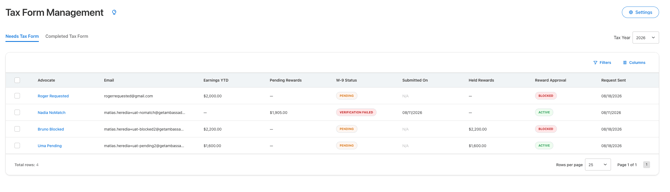
- Pending. Advocate reached threshold and W-9 request has been sent.
- Submitted. The advocate has submitted their tax information and e-signature and is in the verification process. This typically completes within 2–4 hours.
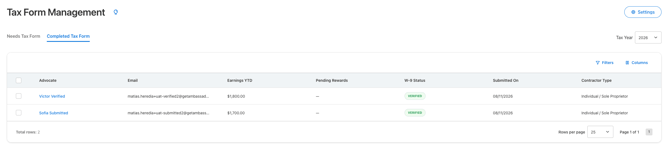
- Verified. The IRS records confirm the tax ID and name belong together. The W-9 is valid: the advocate's banner disappears, any held rewards are released and approved automatically.
Alternatively - Verification Failed. The tax ID and name don't match IRS records (usually a typo, a nickname instead of the legal name, or a name change).
-
Approval Held rewards remain blocked.
- Advocate will need to resubmit a new Tax Form with corrected information.
- You can manually resend the request from within Needs Tax Form table.
- Coming Soon! When a Tax Form status is Verification Failed, an Automation will trigger to notify the advocate with the failure and link to resubmit a new tax form.
You can watch this happen in the Tax Management table — Needs Tax Form:
And once verification completes — Completed Tax Form:
Why verification matters: filing 1099s with tax IDs that don't match IRS records leads to IRS notices and penalties. Verifying at collection time means your records are clean before filing season.
How to resolve errors
Error
The verification could not be completed. Ask the advocate to resubmit their tax information. Contact Ambassador Support if the error continues.
How advocates correct their information
- The advocate opens the tax form from the notification in the Portal, widget, or request email.
- They review their legal name and tax ID.
- They correct any inaccurate information.
- They resubmit the form for verification.
Advocates should enter their legal name exactly as it appears in IRS records.
What happens to held rewards
Rewards with a status of Approval Held remain so until a valid Tax Form is on file for the applicable year. Once the valid tax form is on file, the rewards are automatically updated to the status Approved.
Questions? Review the related articles or contact support@getambassador.com.