
Overview
Go to Rewards & Payments → Tax Management to review advocate YTD earnings, W-9 statuses, and rewards that are currently on hold. This is also where you'll export the W-9s and tax data you need at the end of the year.
Two tabs keep the important advocates in front of you:
- Needs Tax Form: advocates who have crossed the collection threshold (or the $2,000 limit) and do NOT have a verified W-9. This includes Pending, Submitted (verification in progress), and Verification Failed. Think of this as your action list.
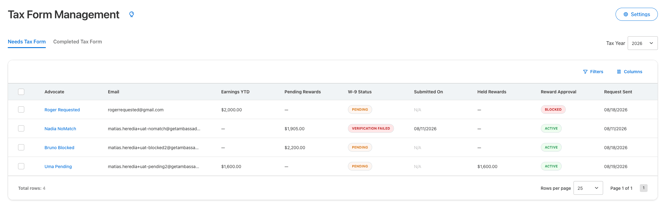
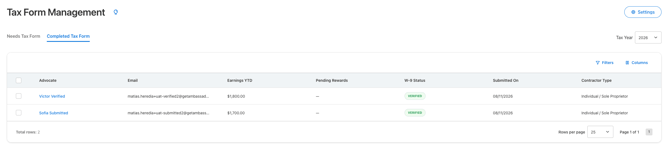
- Completed Tax Form: advocates with a verified W-9 on file. This is the list your authorized users can review and export.
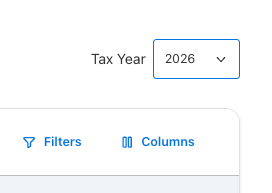
Use the Tax Year selector in the upper right to switch between years, including previous ones.
Use Filters to narrow by W-9 status, contractor type, submission date, or threshold status, and use Columns to show or hide the fields you care about.
What you'll see in the table
Each row gives you the full picture for one advocate:
- Advocate and Email: who they are, and where their tax form requests are being sent.
- Earnings YTD: total rewards earned in the selected tax year.
- Pending Rewards: rewards that are currently on hold waiting on a verified W-9.
- W-9 Status: where they stand today (Pending, Submitted, Verified, or Verification Failed).
- Submitted On: the date their W-9 came in.
- Total Fulfilled: how much has actually been paid out to them.
- Taxable Gross Income: the amount that counts toward 1099 reporting for the selected tax year.
- Contractor Type: the tax classification they selected on their W-9, like Individual / Sole Proprietor.
Taxable Gross Income and the $2,000 threshold
A completed W-9 doesn't automatically mean an advocate needs a 1099. What matters is their Taxable Gross Income for the tax year.
For example: If an advocate’s reward expires unused, it is generally not taxable income to them. Because they did not benefit, you may not be required to report it on a Form 1099. This is why we include both the Total Fulfilled Amount and Taxable Gross Income.
If an advocate's Taxable Gross Income is $2,000 or more, they need a 1099. If it's below that, they don't, even if their W-9 is verified and sitting in the Completed Tax Form tab.
Sorting or filtering on this column and then exporting the 2099 CSV is the fastest way to build your list to import into your system generating the 1099s.
IMPORTANT: Ambassador doesn't provide tax advice. Please confirm reporting thresholds and filing requirements with your own tax advisor or accountant.
Exporting W-9s
You can download the W-9 on file for one advocate or many at once.
- Open the Completed Tax Form tab.
- Select the checkbox next to each advocate you want, or use the header checkbox to select everyone on the page.
- Click Export W-9 PDFs.
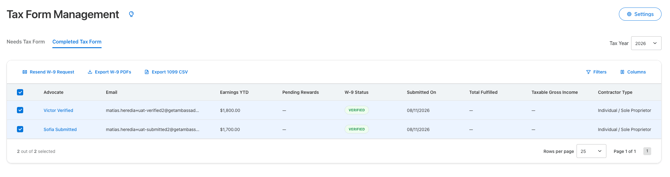
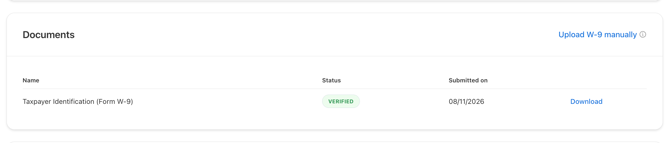
To grab a single advocate's form instead, open their record and download it from the Documents section.
Exporting the 1099 CSV
Ambassador doesn't issue 1099s, but we give you everything you need to generate and send them from your own tax or accounting system.
- Open the Completed Tax Form tab.
- Select the advocates you want to include.
- Click Export 1099 CSV.
The file includes the advocate details you'll need to prepare each form, like legal name, tax classification, mailing address, and taxable gross income for the year. Upload it to your filing system of choice, and you're set.
Resending a W-9 request
If someone's W-9 is missing or failed verification, select them in the Needs Tax Form table and click Resend W-9 Request. For the full walkthrough, including manual uploads, see How to upload and resend W-9 requests.
Reviewing a single advocate
Click any advocate's name to open their tax form record. You'll find:
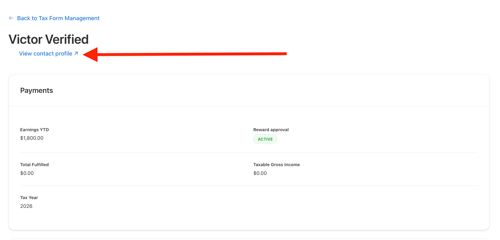
- Payments: Earnings YTD, Reward approval status, Total Fulfilled, Taxable Gross Income, and Tax Year.
- Tax information: legal name, tax classification, masked TIN, and mailing address.
- Documents: their W-9 with its current status and submission date, a Download link, and an Upload W-9 manually option.
- Request history: every email sent and every change made, so you always know what happened and when.
There's also a View contact profile link at the top if you want to jump to their full contact record.
Export Permissions
By default, the Admin and Finance roles have full access to view and download W-9s and the 1099 CSV export. That access applies both in the table view, for one or multiple advocates at a time, and on an individual advocate's tax form record.
If a teammate can't see the export options, check and update their role or create a custom role with applicable permissions.
Questions? Review the related articles or email support@getambassador.com.