
Overview
Tax Form Management helps you collect and verify W-9 information from US-based advocates and manage reward approvals when required tax information is missing.
It tracks advocate earnings by calendar year, requests tax information based on your settings, verifies submitted information, and holds affected rewards when a valid W-9 is not on file.
How Tax Form Management works
Tax Form Management automates the W-9 collection process:
-
Tracks each advocate's year-to-date (approved and fulfilled) earnings from campaigns where the Reward Rule has tax form collection enabled
-
Automatically asks advocates to fill out an electronic W-9, either at onboarding or when reaching your preferred threshold
-
Sends the request by email and shows a banner in the advocate's portal, reward widget, or landing page
-
Collects tax information through a secure, guided form (no paperwork)
- The information is verified against IRS records automatically
-
Holds new reward approvals for an advocate who reaches the $2,000 limit without a valid W-9 for the applicable year
-
Once a W-9 is verified, rewards with an Approval Held status are automatically approved
Important: The earnings limit is fixed at $2,000 per calendar year. You can configure the threshhold for when advocates are first asked to submit their tax information, but the $2,000 limit cannot be changed.
What happens at the earnings limit
When approving a reward would cause an advocate to reach or exceed the $2,000 calendar-year limit without a verified W-9, the reward status changes to Approval Held.
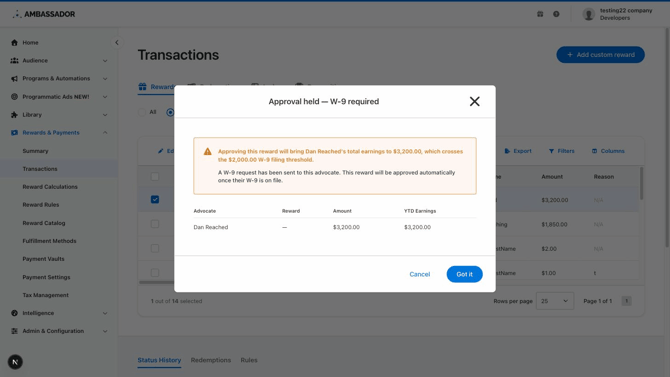
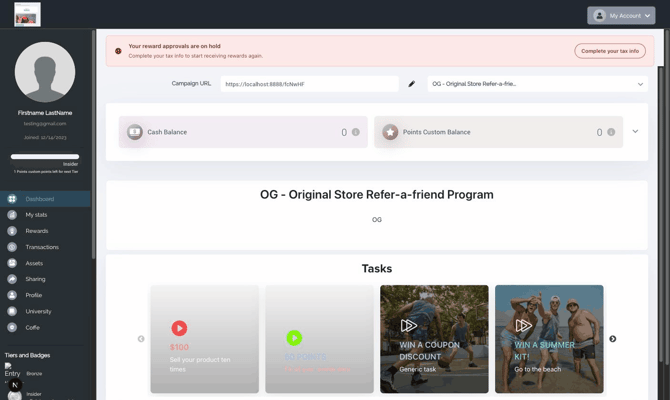
The advocate is notified via email that tax information is required and directed to complete the form. Depending on your settings, they'll either complete it in their Advocate Portal or a tax form widget on your configured landing page.
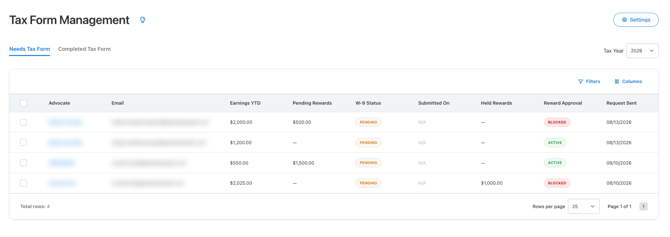
They also appear in the Needs Tax Form view in Tax Form Management, making it easy to see who is affected.
Verification and security
After submission, verification typically takes two to four hours. During this time, the form status is Submitted, and affected rewards remain on hold.
Tax Form Management protects sensitive information by:
- Requiring identity verification before the advocate can complete the form
- Masking tax identification numbers after submission
- Displaying only the last four digits in Ambassador
- Using a standardized, secure tax form that cannot be customized
- Providing secure, time-limited links for W-9 downloads
Once verification is successful, the advocate’s tax form status is Verified and rewards with a status of Approval Held are automatically updated to Approved.
Where to manage tax forms
Go to: Rewards & Payments → Tax Form Management
From here, users with Tax Form access can:
- Configure Tax Form Management Settings
- Monitor advocates approaching or reaching the annual limit
- Review tax form and reward approval statuses
- Resend W-9 requests
- Upload a signed W-9 on an advocate’s behalf
- Review current and previous tax years
- Export W-9
Availability
Tax Form Management currently supports W-9 collection for US-based advocates. International tax forms, including Form W-8BEN, are not supported in the current version.
Questions? Review the related articles or contact support@getambassador.com.